
How to reinstall the Ubigi eSIM profile I deleted on my iPhone/iPad?
See also:
– How to reinstall the Ubigi eSIM profile I deleted on my Android device?
– How to reinstall the Ubigi eSIM profile I deleted on my Windows 10 or Windows 11 device?
If you deleted your Ubigi eSIM profile by mistake on your iPhone/iPad, you can reinstall it easily by following the steps below:
– open the Ubigi app on your device and connect to your Ubigi account
– once connected, go to the Settings tab and click on the “Re-install my Ubigi eSIM” button:
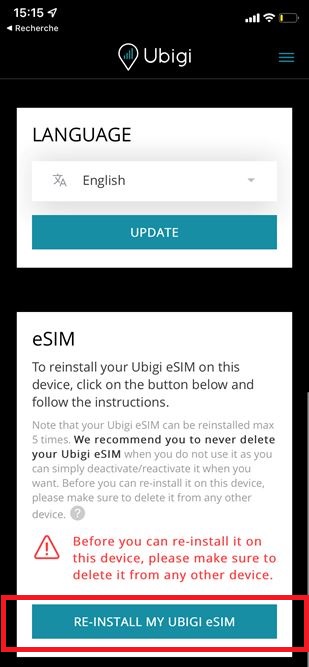
– then follow the instructions on screen to complete the installation.
NB: The re-installation of a Ubigi eSIM profile is limited to 5 times max after deletion. In case you get an error message during a re-installation, please see the following section:
I get an error message when I use the QR code on my Ubigi account to re-install my Ubigi eSIM profile, why?